Bash Bunny
Updated: Nov 9, 2024
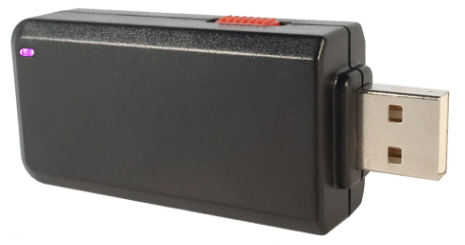
Hak5 created the Bash Bunny, a very flexible USB attack platform mostly used for red teaming and penetration testing. It is a powerful tool for ethical hacking and security assessments because it enables security experts to mimic actual attacks against systems to which they have physical access. Here's a closer look at its characteristics and importance: The Bash Bunny is a multipurpose payload delivery system and physical USB assault tool. It can be configured to carry out a number of tasks, such as modifying and stealing data, installing malware, and getting around security measures. It is made to be connected into a computer's USB port.
Key Features of the Bash Bunny:
USB Attack Platform:
The Bash Bunny is a USB device that, once plugged into a target system, can act like a keyboard and mouse or interface with the system in other ways, enabling rapid execution of payloads. It is especially effective on machines that auto-run USB devices, such as Windows PCs or some Linux distributions.
DuckyScript:
The device uses DuckyScript, a simple scripting language designed to automate keystroke injections. This allows penetration testers and security professionals to quickly create custom payloads. DuckyScript scripts can perform a wide variety of actions, including:
Credential capture (e.g., stealing passwords from a password manager)
Exfiltrating sensitive data (e.g., copying files or logging keystrokes)
Establishing backdoors (e.g., creating remote access tools or reverse shells)
The flexibility of DuckyScript makes the Bash Bunny an ideal tool for quickly crafting tailored attacks.
User-Friendly Design:
The Bash Bunny is designed to be both powerful and user-friendly, with several physical components that enhance the user's experience:
Adjustable Switch: Users can select between different attack modes using the switch, which allows easy control over the device’s operations without needing external software.
LED Indicators: These lights provide visual feedback on the operational status of the device, helping users know when the payload has been successfully executed or if any errors occur during operation.
Geofencing and Remote Triggers:
The Bash Bunny includes support for geofencing and remote triggers. Geofencing means that the device can be programmed to activate only when it is within a certain geographical location, providing additional flexibility for red teamers who want to test scenarios involving physical proximity to the target.
Remote triggers allow the device to be activated or deactivated based on signals from remote systems, enhancing its stealth and flexibility.
High-Capacity MicroSD Card:
The Bash Bunny comes with a MicroSD card slot that supports high-capacity storage, which is used for data exfiltration or storing complex payloads. This feature is particularly useful when handling large volumes of sensitive data or when requiring persistent storage for more advanced attacks.
Use Cases in Cybersecurity:
Penetration Testing: The Bash Bunny can simulate real-world attacks where an attacker gains physical access to a system and then executes a series of automated payloads. This can help organizations identify vulnerabilities in physical security and USB device handling policies.
Red Teaming: Red teams can use the Bash Bunny to simulate attacks in a controlled environment, testing the organization’s detection and response capabilities. The device’s ability to mimic common cyberattack tactics—like credential dumping, data exfiltration, or backdoor installation—makes it an ideal tool for comprehensive testing.
Credential Harvesting: The Bash Bunny can be programmed to steal passwords or access tokens from applications, browsers, or other sensitive storage locations on the target system.
Data Exfiltration: Through payloads designed to search for sensitive documents or information, the Bash Bunny can quickly exfiltrate data via USB storage or network connections.
Persistence: The Bash Bunny can be used to establish persistence on a compromised system by creating scheduled tasks, dropping reverse shells, or configuring remote access tools, ensuring that attackers can maintain access even after reboots or attempts to remove malware.
Security Implications:
Risks of USB Devices: The Bash Bunny exploits the fact that many organizations have insufficient controls on the physical access to their systems. This plug-and-play nature of the device highlights a critical security gap, as users may unknowingly allow attackers to execute malicious payloads simply by inserting a USB device.
Defensive Measures: To defend against Bash Bunny-type attacks, organizations need to implement strict USB port security policies, including:
Disabling USB ports on sensitive systems.
Using software that monitors USB activity and alerts administrators to suspicious behavior.
Implementing whitelisting of allowed devices, ensuring only trusted devices can connect to the system.
Educating employees on the dangers of plugging in unknown USB devices.
More Information
A strong and advanced tool for red teamers, penetration testers, and ethical hackers is the Bash Bunny. It is an essential tool for experts looking to evaluate and enhance an organization's physical security and endpoint security because of its mix of physical access exploitation, customized payload generation, and stealth characteristics. But it also emphasizes how crucial it is to protect physical access points and keep an eye out for odd activity when USB devices are attached. Understanding tools like the Bash Bunny as part of a larger cybersecurity posture can help firms better defend their systems and stay ahead of adversaries.



Comments